How do I change the frequency for Uptime Monitoring?
Currently, we do not have the option to modify the frequency for uptime monitoring. The default settings for monitoring frequency will apply as per the subscription plan selected.
Please note that the monitoring frequency for each subscription plan is different.
For instance, for the free subscription plan, the monitoring will be carried out every hour. For the premium plans, the frequency varies from 15 minutes to 5 minute depending on the plan.
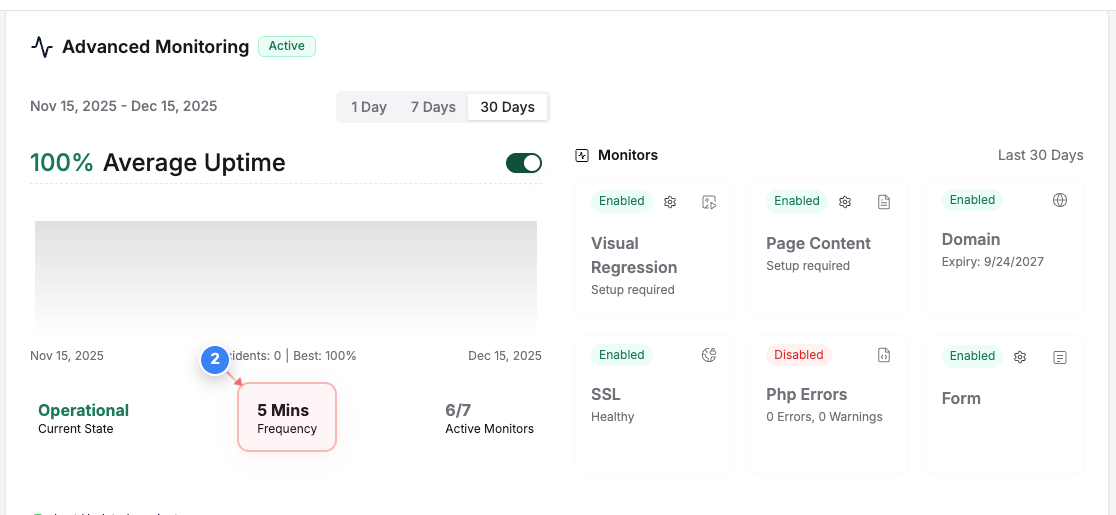
You can find the requency of the Uptime Monioring enabled on your website by following the below steps -
Step 1 of 2
Open site dashboard
Click on your site name in the sites list at the center of the page to open its management dashboard.
Note: This takes you into the selected site so you can view monitoring, performance, and settings.

Step 2 of 2
Uptime Monitoring Frequency
You can find the frequency of the Uptime Monitoring of your website in the Advanced Monitoring window.